SMS Opt-In Disclosure
Last Updated: May 21, 2026
This page describes how end users of the FamRight iOS application consent to receive one-time passcodes (OTPs) by SMS text message, what messages they receive, and how to stop receiving messages. It is the single source-of-truth Call-to-Action (CTA) for FamRight's SMS program and is the page referenced in our A2P 10DLC campaign registration.
Program Summary
| Brand | FamRight |
|---|---|
| Program Name | FamRight Account Verification |
| Use Case | 2FA / Account Verification (transactional, one-time passcodes only) |
| Message Content | One-time passcode (OTP) for account creation, sign-in, account recovery, or phone-number change |
| Frequency | Per-user-request only. A message is sent only when the user takes an action in the app (creates account, signs in, changes phone, requests resend). Frequency varies with usage. |
| Cost to User | FamRight does not charge. Standard message and data rates from the user's wireless carrier may apply. |
| Marketing | None. This program does not send marketing, promotional, or non-transactional messages. |
| Sharing | Mobile information, including phone numbers and SMS opt-in data and consent, will not be shared with any third parties or affiliates for any purpose. |
How End Users Opt In
FamRight is a mobile application distributed via the Apple App Store. The opt-in occurs inside the iOS app on the Create Account screen (and the equivalent Profile Setup screen for users who complete account setup after social sign-in). The screenshot below shows the live opt-in screen exactly as a user sees it.
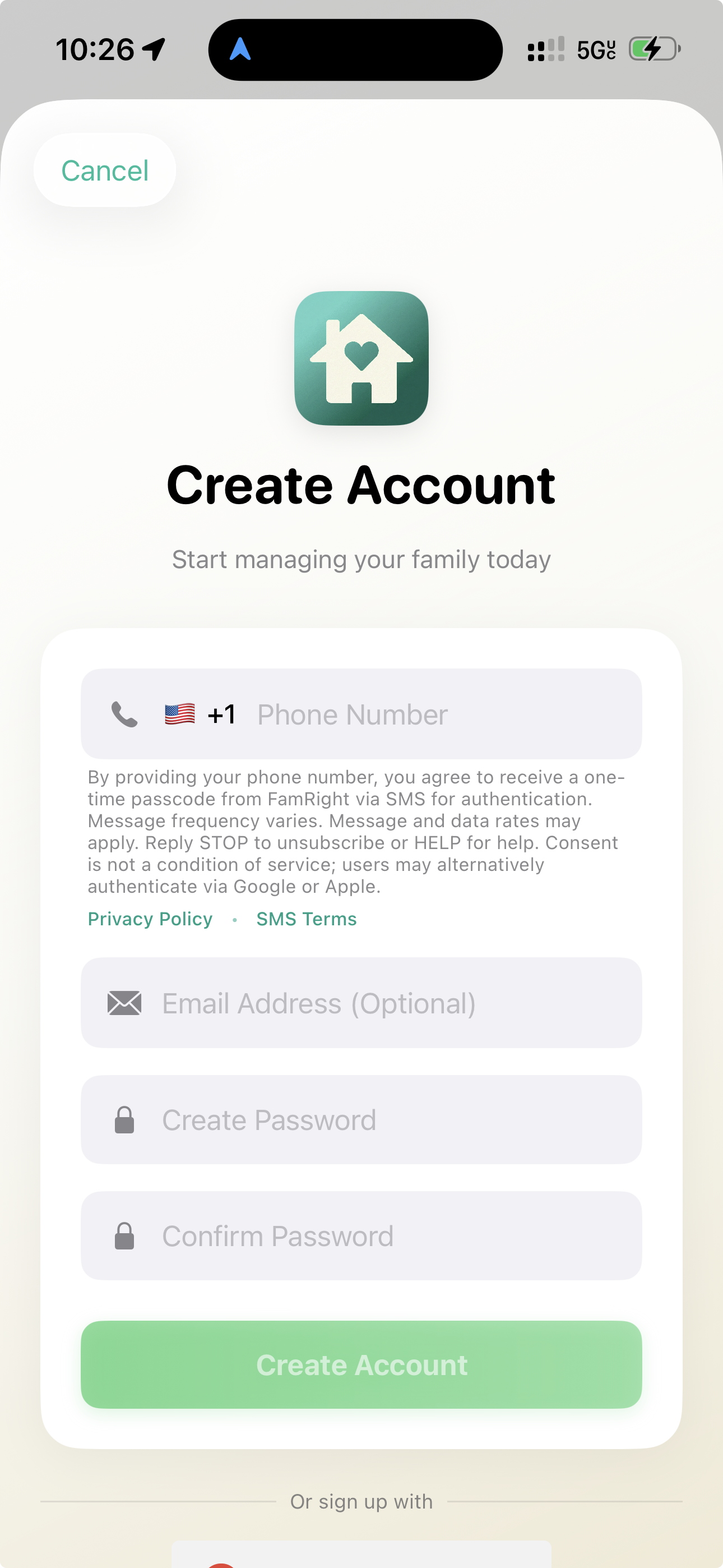
Step-by-step
- User opens the FamRight iOS app and taps Create Account.
- The Create Account screen displays a Phone Number field with the consent disclosure rendered directly beneath it. The disclosure is visible before the user enters their number — it is not hidden behind a checkbox, modal, or link.
- The disclosure includes inline links to the Privacy Policy and the SMS Terms.
- The user enters their U.S. mobile phone number, optionally enters an email and password, and taps Create Account. By tapping Create Account with a phone number entered, the user provides express prior consent to receive an OTP by SMS.
- FamRight sends a single OTP to that number. The user enters the code on the next screen to complete verification.
No third-party data, no purchased lists, no pre-checked boxes. Opt-in is collected only from the natural person who is creating or signing into their own FamRight account on their own device.
Verbatim On-Screen Consent Language
The following text is rendered verbatim under the Phone Number field on the Create Account and Profile Setup screens of the FamRight iOS app:
Sample Messages
The following are representative of the only messages sent under this program. The brand name FamRight identifies the sender in every message.
HELP
If a user replies HELP they receive:
Users may also contact support@famright.com directly at any time.
STOP / Opt-Out
Users may opt out at any time by replying STOP to any message from FamRight. After opt-out, the user receives one final confirmation message and no further SMS from FamRight:
To resume verification SMS after opting out, the user may reply START, or remove and re-add their phone number from within the FamRight app. Opting out of verification SMS may prevent the user from signing in or recovering their account using phone-based authentication; alternative authentication via Google or Apple remains available.
Privacy
For details on how FamRight collects, uses, stores, and protects phone numbers, see our Privacy Policy. Mobile information, including phone numbers and SMS opt-in data and consent, will not be shared with any third parties or affiliates for any purpose.
Full SMS Terms
The complete SMS / Text Message Terms appear in Section 3 of our Terms of Service.
Contact
Questions about this disclosure or the FamRight SMS program may be sent to support@famright.com.